FIELD MANUAL // 09
Reading the Scoreboard
The scoreboard's six sections and how to use them mid-game
The scoreboard is your intelligence desk: every player’s standing, everything the rules let you see about their progress, and the map’s whole economy and win conditions in one place. It’s live — rows shift as the game runs, and almost everything expands when you ask.
It shows up to six parts, top to bottom: a card for whatever territory you’ve focused, PLAYERS // STANDINGS, BONUSES // YIELDS, BONUS GROUPS // OBJECTIVES, VICTORY PATHS // WIN, and RECENT // TRANSITIONS. Parts a map doesn’t use simply don’t appear — a map with no objectives shows just the standings and the yields.
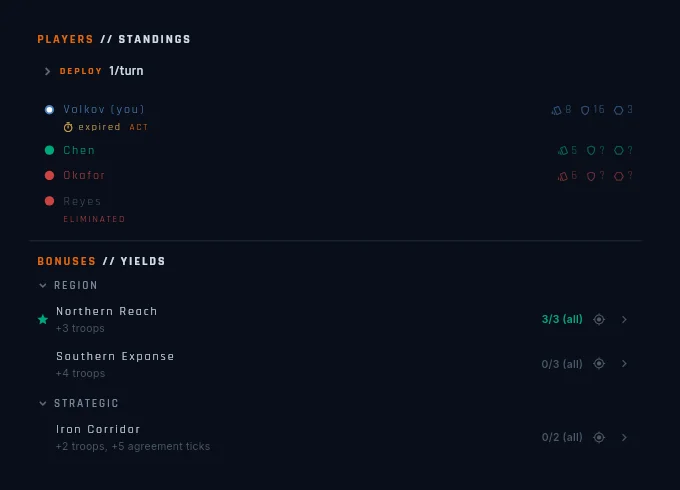
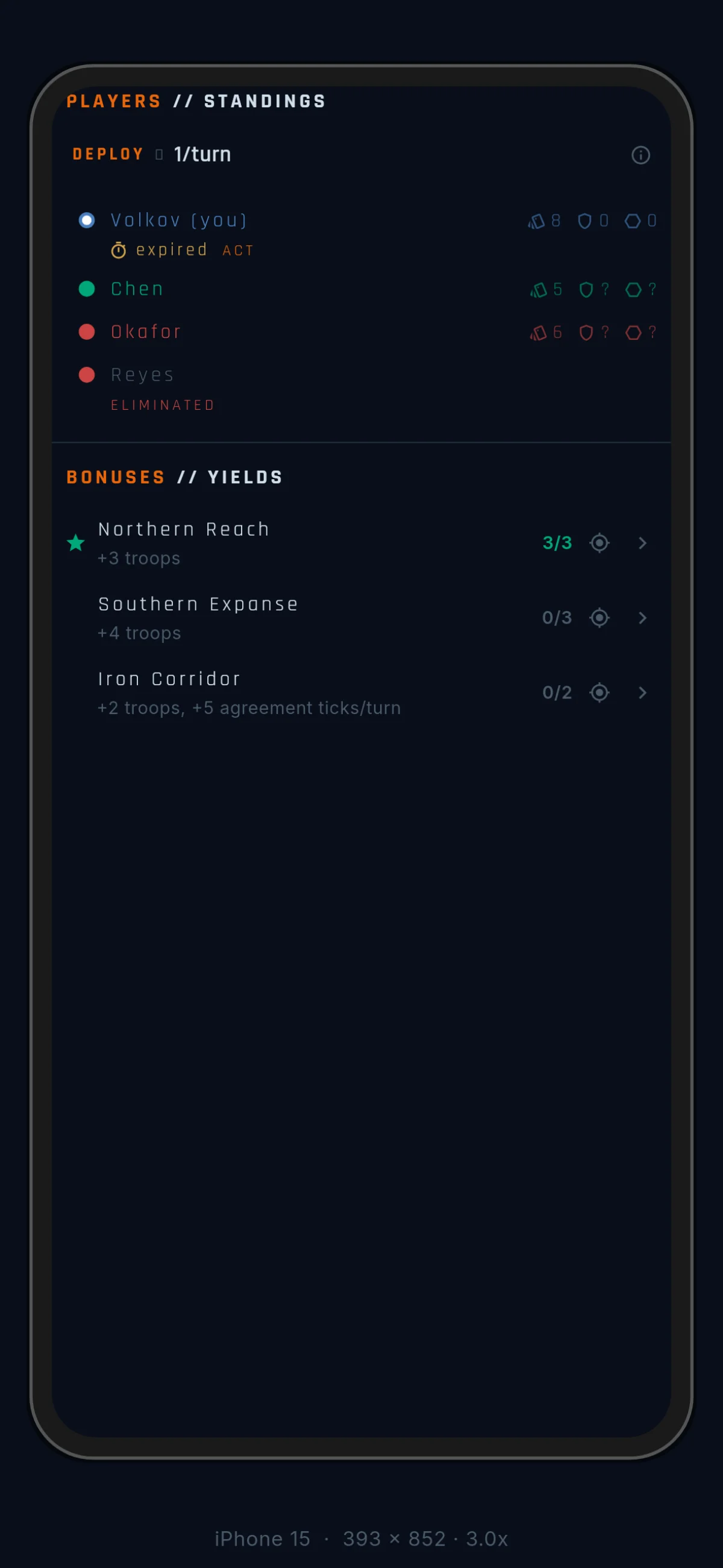
One habit makes the whole surface work: almost every name on it is a “show me” link. Tap it and the camera frames the territories it refers to, ringed with the orbit ring — and stays there. That works even with a map overlay open.
The focused-territory card
When you’ve focused a territory on the map, its card pins to the top of the scoreboard — name, owner, garrison, borders, and its bonus zones. The zone pills are “show me” links.
PLAYERS // STANDINGS
The section opens with your income line: a DEPLOY row that expands into the full breakdown — base, from bonuses, this round, effective, next round. The estimate already includes everything: every payout shape, objective income at its next value, and any scheduled penalty. Use it to sanity-check a plan before you commit troops to it.
Then the standings. Every player has a row. Yours shows your numbers;
opponents’ troop and territory cells show ? where fog applies — what
you can’t see on the board, you can’t read off a table either.
An amber ★IMMINENT pill beside a name means that player is close to
completing an objective. The pill says who; expand their row to find
out what.
Rows expand into that player’s objectives — only the ones they’ve made progress on or finished. (The full menu of what could be chased lives in VICTORY PATHS // WIN below.) Each objective expands again into the details: whether progress banks or lapses, the hold rule, the pressure rule, and the requirement drawn as a short outline. Every bonus named in it is tappable. One tap turns “an objective called The Triple Crown” into “those three territories, right there.”


BONUSES // YIELDS
The map’s income layer, grouped by bonus type under the author’s headers. Tap a header to fold its group. Your completed bonuses float to the top of their own group.
Each row reads requirement in, payout out, with the badge carrying the
shape: 3/5 (all) for hold-everything, 3/5 (min 3) for
hold-at-least, a bare 2/6 plus a payout line for per-territory
zones (see Winning). Negative zones show
bold red.
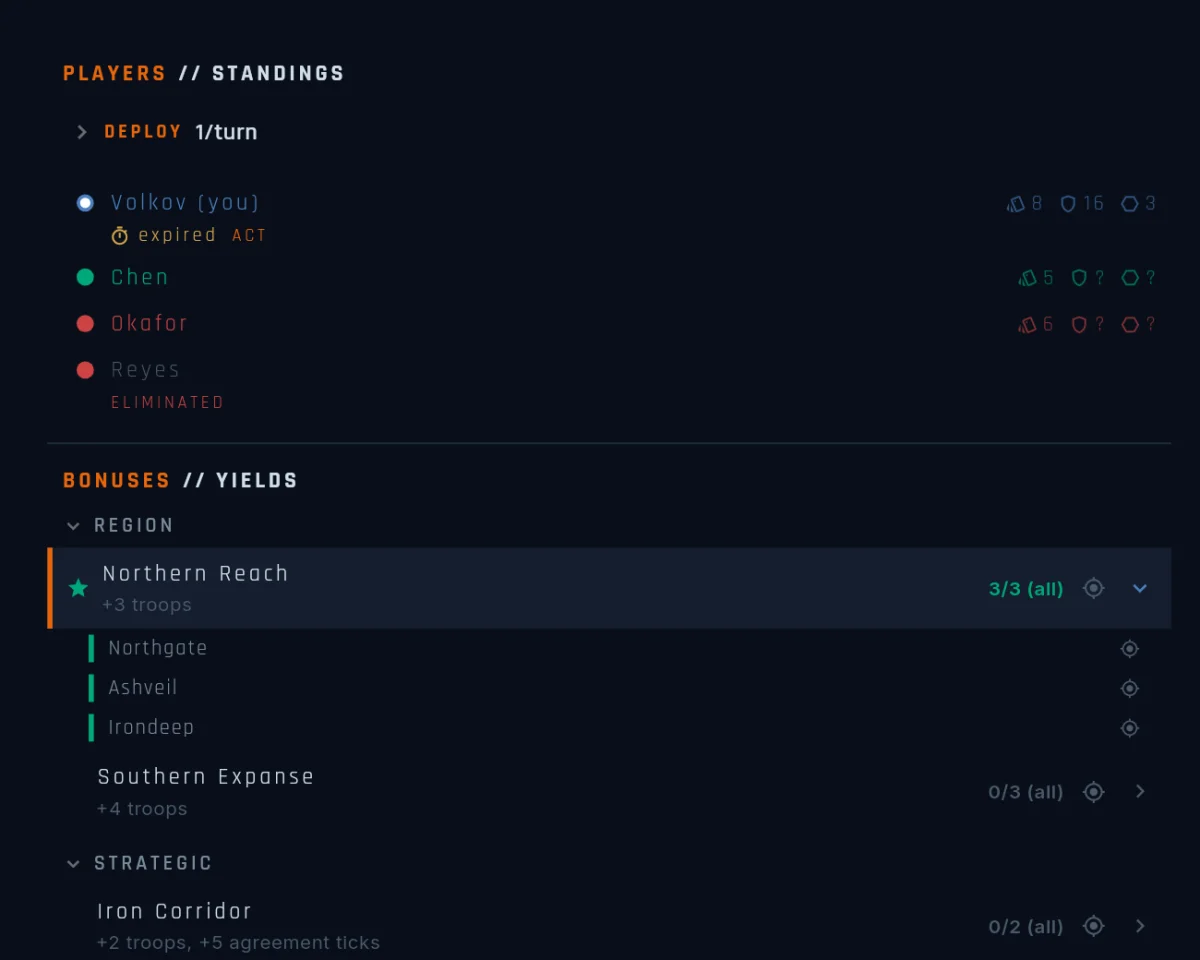
A teal star on a row means held for objectives — the zone currently counts toward requirements. For a per-territory zone the star is not “is it paying”: those zones pay from the first territory either way.
Rows expand into one line per territory — a teal mark on the ones you own, a muted one otherwise, each with its own “show me” link.


BONUS GROUPS // OBJECTIVES
Only on maps that author bonus groups. The section lists every group on the map — the groups themselves are public; what fog hides is each player’s progress against the ones their author made private (Winning).
Every row carries a one-line payout contract (pays +3 troops, or
for a ramp, the start and the destination), plus live gauges, an
expandable requirement outline with tappable names, and a dot on the
right edge that lights while the requirement is met. If you’re holding a group mid-ramp, the row
also shows what it will pay once the ramp tops out.

VICTORY PATHS // WIN
Only on maps with victory objectives. This is the map’s win conditions as structure — what the paths are, before anyone holds anything. On a category map, a line at the top states the gate: fill N of M categories to win.
Each objective gets a row with its name, its category chip, and a hold
tracker reading TURN x/n — red until the requirement is met, teal
once it is. The little glyph beside it tells you how progress behaves:
a pin means it banks once complete; a bolt means it lapses if you lose
the requirement.
Rows expand to the hold rule, the underlying group’s payout contract and requirement, and “show me” links on everything named.
The hold count here is yours. Opponents’ progress lives on their rows up in PLAYERS // STANDINGS — this section never shows their state.

RECENT // TRANSITIONS
The last 8 objective changes (gained, lost, advanced, holding, lapsed, completed) as one-liners with round stamps. The section hides itself when there’s nothing to show.
Tap any line and the event log opens, already filtered to Objectives — the trail back to how the board got here.
The scoreboard and the event log
The two surfaces hand off to each other. Tap an objective event in the log and the scoreboard opens on that player’s row with the right objective already expanded — the row flashes briefly and scrolls into view, so you don’t lose your place flipping between them.
Going the other way, the log’s Objectives filter chip scopes it to objective news only — useful when the table is mid-negotiation and the chatter has buried the objective news.